You’ve got a great song idea, but when you plug your microphone into your computer, the latency makes it impossible to record in real time. That frustrating delay is often the fault of an audio interface that wasn’t built for seamless DAW integration. A hybrid mixer that doubles as a USB audio interface solves this problem by combining analog mixing with digital connectivity, giving you low-latency recording, flexible routing, and the tactile control you need to capture your best performances.
Using the wrong mixer for your DAW can kill your creative flow. Cracks, pops, and dropouts ruin takes, while limited inputs force you to compromise on your recording setup. On the other hand, a well-chosen hybrid mixer streamlines your workflow, reduces post-production work, and lets you focus on making music instead of troubleshooting gear.
What makes a great hybrid mixer for DAW use? First, preamp quality matters: clean, quiet preamps with enough gain for dynamic microphones. Second, connectivity: at least one USB port for stereo or multi-channel audio, plus MIDI I/O for syncing with your DAW. Third, effects processing: onboard EQ, reverb, and compression can save time during tracking. Finally, build quality and format: a rugged unit that fits your studio space and survives regular use.
In 2026, the market for hybrid mixers spans from $30 to $699, with brands like Behringer, Roland, Mackie, and Allen & Heath offering options for every budget. The trade-offs are clear: more channels and higher-quality preamps cost more, but even entry-level models now include USB audio and basic effects.
This guide evaluates 10 leading hybrid mixers for DAW integration. We compare them on preamp quality, channel count, USB connectivity, effects, and overall value to help you find the best match for your home studio, podcasting setup, or live recording rig.
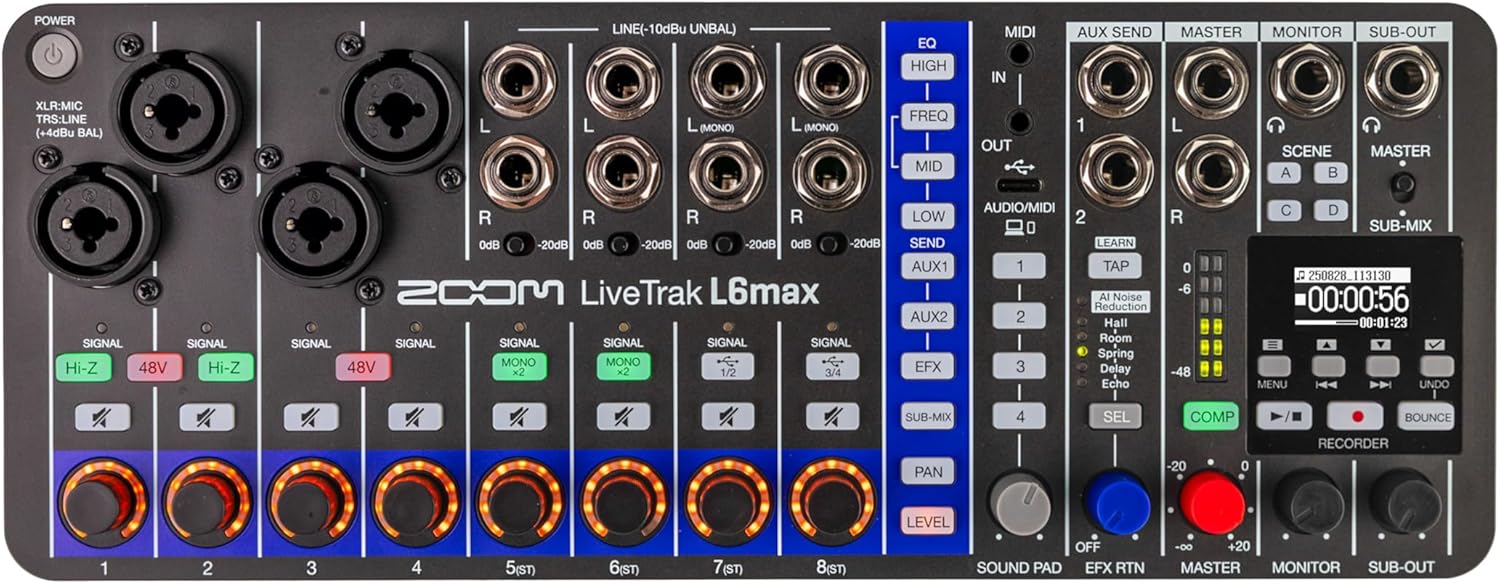
The Zoom LiveTrak L6max is a 12-channel, battery-powered digital mixer and multitrack recorder with 32-bit float audio, AI noise reduction, and sound pads. It is best for mobile musicians, podcasters, and live performers who need a compact, all-in-one rig that records clean multitrack audio without a computer.
Pros & Cons
Pros
12 channels and 14-track recording in a compact, battery-powered unit
32-bit float dual AD converters on channels 1-4 prevent clipping with extreme input levels
AI noise reduction cleans up background noise in real time, reducing post-production work
USB class-compliant audio interface works with many PCs and Macs without extra drivers
Intuitive layout with assignable rotary controls, scene storage, and built-in effects for quick live changes
Multiple power options including AA batteries, USB bus power, or a mobile battery pack
Cons
Official Windows ASIO driver has reported stability issues, requiring third-party workarounds like FlexASIO
Battery life is limited without connecting a USB-C power supply
32-bit float recording is available only on the four combo inputs, not on the eight stereo line inputs
Detailed Review
The Zoom LiveTrak L6max is a 12-channel digital mixer and multitrack recorder built for musicians, podcasters, and live streamers who need a portable, all-in-one solution. With four combo XLR/TRS inputs, eight stereo line inputs, and the ability to record 14 separate tracks to an SD card, it replaces multiple pieces of gear in a compact 2.2-pound chassis.
Unlike desktop-bound interfaces, the L6max runs on AA batteries, USB power, or a mobile battery pack, making it a dependable partner for location recording, outdoor jam sessions, or any gig where wall power is unreliable. The 32-bit float recording on channels 1-4 means you never have to stress about clipping when a vocalist suddenly belts or a drummer hits harder than expected. You can focus on the performance and sort out levels later.
The layout is easy to learn: a vertical button column assigns each channel's rotary knob to volume, pan, EQ, or effects, and scenes save your whole setup for instant recall between acts. The mic preamps are clean, the headphone amp is solid, and the jacks feel robust enough for regular travel and gig use.
There are honest drawbacks. The official Windows ASIO driver has caused freezes for some users, and a third-party driver like FlexASIO is sometimes needed. Battery life is also short when running on AAs alone, so plan to bring a USB-C power source for longer sessions. And if you need 32-bit float on every channel, note that only the four combo inputs offer it.
If you are a mobile musician, podcaster, or electronic artist who wants a compact mixer with serious recording capability and a short learning curve, the L6max is a fantastic choice. If you require 32-bit float on all inputs or depend on stable Windows drivers out of the box, consider your workflow carefully or budget for a workaround.
Key Features
12-Channel Mixing with 14-Track Recording: Connect four mics or instruments and eight stereo line sources, then record every input separately to SD cards up to 2TB. This gives you complete multitrack capture for live shows, rehearsals, or podcasts without needing a laptop.
32-Bit Float Dual AD Converters (Channels 1-4): Record extreme dynamics without clipping. Quiet dialogue and loud peaks both come through clearly, so you can skip constant gain adjustments during unpredictable performances.
AI Noise Reduction: Hum, hiss, and background noise are removed in real time while preserving the voice and instrument details. This is a huge time-saver when recording in noisy venues or untreated rooms.
Built-In Effects and 3-Band EQ: Add reverb, delay, compression, and EQ without external pedals or plugins. It helps you craft a polished sound quickly and carry less gear.
Sound Pads with MIDI Clock Sync: Trigger samples, jingles, and sound effects in sync with your MIDI gear. Perfect for electronic performances and live podcast intros.
Multiple Power Options: AA batteries, USB bus power, or a mobile battery pack let you record and perform anywhere. This is essential for field recordings, street performances, or remote sessions.
USB Audio Interface: Class-compliant USB connectivity supports 48kHz/24-bit streaming to a computer for live streaming or DAW recording. Many users find it works without installing drivers.
Use Cases
Live Band Rehearsal and Recording: Set up mics and instruments, hit record, and capture every channel separately. Later blend the tracks in your DAW to create a rough mix or a finished recording.
Mobile Podcasting: With four mic inputs and sound pads for intros, outro music, or listener questions, the L6max turns into a portable podcast studio. Battery power lets you record interviews in a car, coffee shop, or outdoors without hunting for an outlet.
Live Electronic Performance: Use the sound pads, MIDI clock, and effects sends to build a compact setup with drum machines, synths, and a microphone. The small footprint fits on a crowded desk or performance table.
Content Creation and Streaming: The USB audio interface connects to your computer for streaming, while the SD card recording serves as a high-quality backup. You can record your voice and game or instrument audio on separate tracks for easier editing.
Field Recording and Location Capture: The rugged, compact design and multiple power options make it suitable for recording rehearsals in unusual spaces, outdoor workshops, or quick interviews on the go. Just press record and keep the energy flowing.
The Behringer XR18 is a versatile 18-input digital mixer with 16 MIDAS-designed preamps, built-in Wi-Fi, and 18x18 USB recording. Ideal for live sound and studio use, it offers pro-grade audio quality and tablet control for flexible mixing on the go.
Pros & Cons
Pros
Exceptional sound quality from MIDAS preamps rivals high-end consoles.
Seamless tablet integration with responsive, full-featured app.
Built-in Wi-Fi module works reliably without extra hardware.
Extensive I/O: 16 XLR inputs, 2 main XLR outs, plus TRS and aux outputs.
Affordable price point for a fully-featured digital mixer with recording capabilities.
Cons
No physical faders; all control is via tablet, which may be a learning curve for traditional users.
Built-in Wi-Fi range can be limited in large venues; a dedicated router may be needed for extended coverage.
USB audio interface limited to 18x18 channels; higher channel counts require external interfaces.
No onboard processing for standalone operation without a tablet.
Detailed Review
The Behringer XR18 is a powerful 18-input digital mixer designed for live sound reinforcement, recording, and studio applications. It features 16 programmable MIDAS-designed preamps that deliver exceptionally clean, low-noise audio, a hallmark of professional-grade consoles. The built-in Wi-Fi module allows direct connection to iPad or Android tablets via the X-AIR app, giving you full control over EQ, dynamics, effects, and routing from anywhere within range.
In real-world use, the XR18 shines in small-to-medium venues, rehearsal spaces, and house-of-worship settings. The 18x18 USB audio interface simplifies multi-track recording to a computer or iPad, making it a versatile tool for live albums or practice sessions. The Dugan-style auto-mixing feature (available via future firmware) intelligently manages microphone gain sharing, reducing feedback and engineer workload.
Build quality is solid for the price, with a metal chassis and robust connectors. At 7.1 pounds, it's portable enough for mobile setups. However, the lack of physical faders means you rely entirely on the tablet interface, this can be a drawback for those who prefer tactile control or need quick adjustments during a performance. Wi-Fi range is adequate for most rooms but may require an external router in larger spaces.
Overall, the Behringer XR18 offers exceptional value for musicians, sound engineers, and content creators who want a compact, feature-packed digital mixer with pro audio quality. It's best for those comfortable with tablet-based workflows and who need integrated recording capabilities.
Key Features
16 MIDAS Programmable Preamps: These preamps provide ultra-low noise, high headroom, and transparent gain, critical for capturing delicate acoustic instruments or powerful vocals without coloration.
Built-in Tri-Mode Wi-Fi Router: Eliminates the need for external network hardware. You can connect your tablet directly to the mixer for instant control, or use it as an access point for multiple devices.
18x18 Multi-Channel USB Audio Interface: Streams up to 18 inputs and 18 outputs over USB, enabling direct multi-track recording to your DAW or iPad without extra converters.
Dugan-Style Auto-Mixing: Automatically adjusts microphone gain sharing to maintain consistent levels and minimize feedback, especially useful for panel discussions, conferences, or multi-mic setups.
Comprehensive App Control: The X-AIR app offers full parameter control, including 4-band parametric EQ, compression, gates, and 8 stereo effects processors. You can create and recall scenes for different shows.
Versatile I/O: 16 XLR/TRS combo inputs, 2 XLR main outputs, 4 aux sends, and 4 TRS outputs provide flexibility for monitoring, effects loops, and subwoofer feeds.
Use Cases
Live Bands & Small Venues: The XR18 is perfect for mixing a full band in clubs, bars, or outdoor stages. Its 16 inputs handle drums, guitars, vocals, and keys, while the tablet control lets the sound engineer roam the room to dial in the mix.
House of Worship & Corporate Events: Auto-mixing and scene recall simplify managing multiple speakers or worship teams. The built-in recording capability captures sermons or performances for later podcasting or archiving.
Studio Recording & Podcasting: Use the XR18 as a multi-channel USB interface to record up to 18 tracks simultaneously. Its MIDAS preamps ensure clean captures for demos, live sessions, or remote recording setups.
Rehearsal Spaces: Bands can use the mixer for practice, recording rehearsals for review, and quickly adjusting levels via tablet without interrupting the flow.
Portable Systems: Lightweight and compact, the XR18 is ideal for mobile DJs, solo performers, or anyone who needs a high-quality mixer that fits in a backpack.
The Allen & Heath ZEDi-10FX is a compact hybrid mixer and 4x4 USB interface that combines studio-quality preamps, 61 built-in FX, and robust analog controls. Ideal for singer-songwriters, podcasters, and small venues needing a versatile all-in-one solution.
Pros & Cons
Pros
Exceptional preamp quality with low noise and high headroom, comparable to much more expensive consoles.
Versatile 4x4 USB interface at 96kHz with class compliance – no driver installation needed for most devices.
61 built-in FX with tap tempo that sound genuinely good, not like typical compact mixer effects.
Robust build quality with Neutrik connectors and chassis-mounted components for long-term durability.
Easy-to-use layout with clear labeling and intuitive controls, suitable for beginners and pros alike.
Cons
Only 10 channels (4 mono + 2 stereo) – may be limiting for larger bands or complex setups.
No built-in Bluetooth or wireless connectivity; requires cables for all inputs.
Slightly heavier than some comparable mixers (5.1 lbs) – less portable for ultra-mobile recording rigs.
FX unit is good but not as deep as dedicated outboard processors; some users may want more editable parameters.
Detailed Review
The Allen & Heath ZEDi-10FX is a hybrid analog mixer and USB audio interface designed for musicians, podcasters, and small venues who want the tactile control of a physical mixer with the convenience of digital recording. It packs 4 mono channels with studio-grade GS-Pre preamps, 2 stereo channels, and a built-in FX processor with 61 algorithms derived from A&H's flagship digital consoles.
In real-world use, the preamps deliver exceptionally clean gain with minimal noise – even when driving dynamic microphones like the SM58. The 3-band MusiQ EQ is musical and forgiving, making it easy to shape vocals or acoustic guitars without harshness. The 100Hz high-pass filter is a lifesaver for cleaning up stage rumble or handling plosives. The FX unit offers usable reverbs, delays, and modulation with tap tempo, though the parameters are limited compared to dedicated units.
Build quality is excellent: Neutrik connectors, metal chassis, and pots mounted directly to the board ensure reliability. The USB interface is class-compliant, so it works out of the box with Mac, Windows, and even Android tablets via OTG. The 4x4 routing allows you to record up to 4 channels simultaneously or stream the main mix plus FX.
Limitations include the channel count – only 10 inputs total, which may be tight for drum-heavy setups or larger bands. Also, there's no Bluetooth or wireless streaming, and the weight (5.1 lbs) is noticeable if you're backpacking to a gig. However, for solo performers, duos, or small studios, the ZEDi-10FX offers exceptional value and sound quality.
Who should buy it: Singer-songwriters, podcasters, home studio owners, and small venues that need a reliable mixer with quality built-in FX and easy USB recording. Who should skip it: Large bands needing more channels, or users who require advanced digital routing or wireless features.
Key Features
GS-Pre XLR Preamps: Developed from the GS-R24 studio console, these preamps provide ultra-low noise (better than -127dB EIN) and massive headroom. You get clean, warm gain even with high-impedance mics or ribbon microphones.
61 Studio-Quality FX: Built-in reverb, delay, chorus, flanger, and more with tap tempo. The algorithms are from A&H's digital consoles, so they sound natural and not tinny. Use them for live performance or to add polish to recordings.
4x4 USB Interface at 96kHz: Record up to 4 channels simultaneously (e.g., main mix, aux, FX) or stream stereo. Class-compliant means no driver hassle on Mac/Windows and works with iOS/Android via USB OTG.
MusiQ 3-band EQ with High-Pass Filter: Frequencies chosen for musicality – cut or boost lows (80Hz), mids (2.5kHz), and highs (12kHz) without harshness. The 100Hz HPF removes low-end rumble from stage or handling noise.
Robust Build: Separate internal channel boards, Neutrik XLR and TRS connectors, and all potentiometers fixed to the chassis. This ensures long-term durability even with frequent transport and use.
Flexible Routing: Each channel has a dedicated FX send and aux send, plus you can route USB audio to aux or FX sends for computer-based processing. The main mix can be sent via XLR or RCA outputs.
Use Cases
Home Studio Recording: Perfect for singer-songwriters recording vocals, acoustic guitar, and a backing track. Use the USB interface to capture two mics and a DI guitar simultaneously, add reverb via the built-in FX, and monitor with zero latency.
Live Solo or Duo Performances: Take it to coffee shops or small stages. Plug in two mics and a DI for guitar, add subtle reverb, and send the mix to a PA or powered speaker. The EQ helps tame feedback-prone venues.
Podcasting / Streaming: Connect up to 4 mics (e.g., host + guests) and a stereo source for music or sound effects. Use the USB interface to stream directly to your computer with clean audio, and apply compression or EQ from your DAW.
Mobile Recording via Tablet: Since it's class-compliant, you can connect an iPad or Android tablet via USB OTG and record with apps like GarageBand or Cubasis. Perfect for location recording without a laptop.
Small Venue Sound Reinforcement: Use as a front-of-house mixer for bands with up to 4 vocal mics, 2 DI instruments, and a stereo keyboard. The FX unit can add reverb to vocals while delay is sent to the aux for a separate monitor mix.
The Behringer DDM4000 is a feature-packed 5-channel digital DJ mixer offering beat-synchronized sampling, four multi-FX sections, dual BPM counters, and MIDI control. Ideal for both beginner and intermediate DJs who want professional-level functionality at an affordable price.
Pros & Cons
Pros
Exceptional value for money with features typically found on mixers costing three times as much.
Optical faders resist oxidation and wear, ideal for humid climates and heavy use.
Intuitive front-panel layout makes learning curve minimal even for beginners.
Customizable output routing and user presets allow quick adaptation to different setups.
MIDI implementation adds flexibility for digital DJs using software.
Cons
Knobs and buttons feel plasticky and may not withstand heavy club abuse.
Headphone jack placement near channel faders can interfere with cueing.
Some units have reported freezing or resetting issues during live sets.
Crossfader may require upgrade to optical version for optimal performance.
Detailed Review
The Behringer DDM4000 is a 5-channel digital DJ mixer designed for DJs who want advanced features without breaking the bank. It targets bedroom producers, mobile DJs, and even club installs on a budget. The mixer packs a beat-synchronized sampler, four multi-FX engines, dual BPM counters, and full MIDI control, capabilities usually reserved for high-end units.
In real-world use, the sampler allows you to record and loop phrases in sync with the beat, perfect for live remixing. The four FX sections can be applied independently to channels, giving you reverb, delay, flanger, and more simultaneously. The dual BPM counters help with beat matching, and the optical faders ensure quiet, smooth operation over time. However, build quality is a mixed bag: while the internal electronics are solid, the plastic knobs and buttons feel less durable than metal counterparts. Some users report the mixer freezing or resetting during performances, which can be catastrophic live.
For home studios or casual gigs, the DDM4000 offers incredible value. For nightly club use, consider upgrading the crossfader to optical and handling the unit with care. Overall, it's a fantastic entry point into digital mixing with room to grow.
Key Features
Beat-Synchronized Sampler: Record and loop audio in real time, automatically synced to the beat. Perfect for adding vocal snippets or drum loops to your mix.
Four Multi-FX Sections: Apply effects like echo, filter, and phaser independently to up to four channels, giving you creative control without external processors.
Dual BPM Counters: Patented technology analyzes two tracks simultaneously, helping you match tempos accurately for seamless transitions.
Optical Faders: Contactless optical sensors eliminate wear and oxidation, ensuring smooth, noise-free fades even in humid environments.
MIDI Connectivity: Map the mixer to DJ software like Traktor or Serato for expanded functionality, including pitch control and cue points.
Flexible Inputs: Each of the four stereo channels accepts both phono and line sources, with rear-panel switching to accommodate turntables, CDJs, or other line-level gear.
Use Cases
Mobile DJ: The DDM4000's compact size and versatile inputs make it ideal for weddings, parties, and corporate events where you need to connect multiple sources quickly.
Home Studio: Use it as a central mixer for production, sampling, and practicing. The MIDI out allows integration with DAWs for recording and automation.
Club Install (Budget): While not built like a tank, the optical faders and user presets make it suitable for venues with moderate usage. Upgrade the crossfader for added durability.
Beginner DJ: Learn beat matching, EQ kills, and effects on a mixer that offers pro features at an entry-level price. The intuitive layout reduces the learning curve.
The Behringer XENYX 802S is an 8-input analog mixer with a built-in USB audio interface, delivering ultra-low noise performance ideal for streamers, podcasters, and small gigs. Its direct mixing of PC/gaming audio into the streaming output makes it a versatile hub for content creators.
Pros & Cons
Pros
Ultra-low noise floor ensures clean recordings even with high gain.
Separate main and monitor mixing allows independent headphone and speaker feeds.
Solid build quality and reliable performance for the price.
USB streaming interface eliminates need for external audio interface.
Cons
Power supply feels less robust compared to older versions (as noted in reviews).
USB DAC audio quality is adequate but not top-tier for critical listening.
No EQ on the USB output; requires using a channel for tone shaping.
Detailed Review
The Behringer XENYX 802S is a premium analog 8-input mixer designed for streamers, podcasters, musicians, and small live sound setups. It combines analog mixing with a stereo USB audio interface, allowing you to blend multiple audio sources, microphones, instruments, and computer audio, into one clean output for streaming or recording.
The mixer features ultra-low noise circuitry, which means you get a quiet signal path even when boosting quieter sources. Each channel has a 3-band EQ (bass, mid, treble) for tone shaping, plus a dedicated preamp with gain control. The built-in USB interface connects directly to your PC, Mac, or mobile device, letting you record or stream without an external audio interface.
Build quality is solid for the price point, though some users note the included power supply feels less robust than earlier models. The layout is intuitive: all jacks, knobs, and faders are clearly labeled, making it easy to adjust levels on the fly. The mixer also features a separate monitor output independent of the main mix, perfect for headphone cues while your audience hears a different blend.
In real-world use, the XENYX 802S excels as a desktop hub. You can plug in a microphone, gaming console, and PC audio simultaneously, then route everything to your streaming software with zero latency monitoring. For small live gigs, it pairs well with powered speakers, offering quick setup and reliable performance. The main limitation is the USB DAC quality: while adequate for podcasting and general use, audiophiles may prefer a dedicated DAC for critical listening. Additionally, there is no EQ on the USB output, you need to insert the USB signal into a channel to shape its tone.
Who should buy it? Streamers, podcasters, and musicians who need a simple, affordable way to mix multiple audio sources into their computer. Small venue performers will appreciate its portability and ease of use. Who should skip it? Professionals requiring pristine DAC quality or extensive routing flexibility should look at higher-end digital mixers. Overall, the Behringer XENYX 802S delivers impressive value for its price.
Key Features
8 Input Channels (XLR/TRS Combination): Connect up to four microphones or line-level instruments simultaneously with individual gain controls.
Built-in USB Streaming Interface: Record or stream directly to your computer without extra hardware, supports both recording and playback.
Ultra-Low Noise Circuitry: Keeps the signal clean even at high gain settings, eliminating hum and hiss from your recordings.
3-Band EQ per Channel: Shape the tone of each input, cut muddiness, add clarity, or enhance presence without external processing.
Independent Main and Monitor Mixes: Send a different blend to headphones (or stage monitors) while the audience hears your main mix, ideal for cueing.
RCA and 1/4" Outputs: Connect to powered speakers, recording devices, or additional audio systems with flexible connection options.
Use Cases
Live Streaming & Gaming: Combine your microphone, game audio, and background music into one stream. Monitor your mic and computer audio separately with the headphone output.
Podcasting: Record multiple hosts or guests with individual mic channels. Use the USB interface to capture directly into your DAW or podcasting software.
Small Live Gigs: Pair with two powered speakers for an easy-to-transport PA system. Adjust levels for vocals and backing tracks on the fly.
Desktop Audio Hub: Connect multiple audio sources (computer, TV, gaming console, mobile device) and route them to speakers or headphones. Switch sources instantly with volume control per input.
Home Recording: Record demos or song ideas with up to four microphones or instruments simultaneously. No need for an external audio interface, just plug and play.
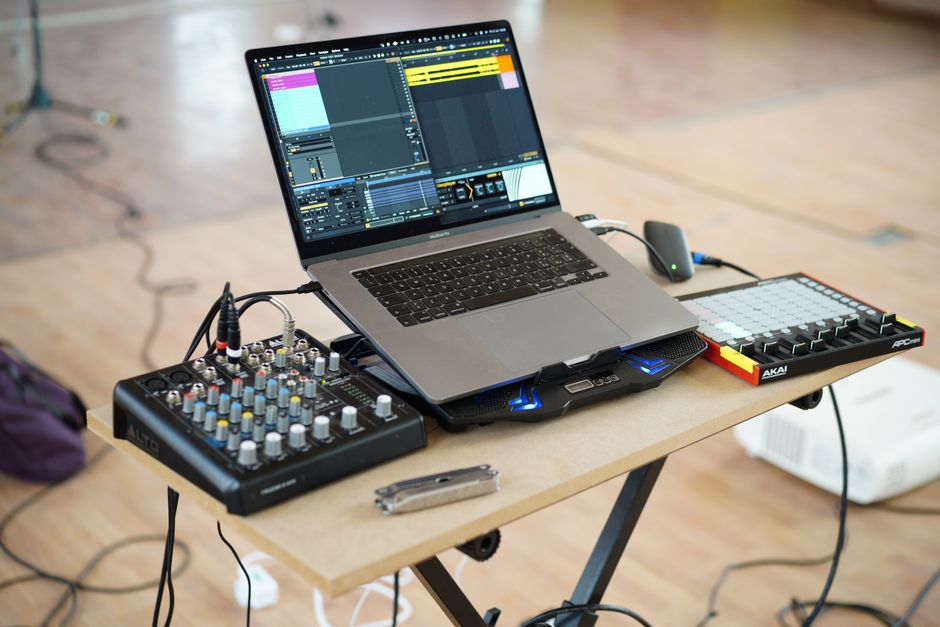
Photo by Tima Miroshnichenko
Best Hybrid Mixers to DAW Buying Guide
Preamps and Audio Quality
The preamp is the first stage your audio signal passes through. A clean, low-noise preamp with enough gain for quiet sources like dynamic microphones is essential for professional recordings. Look for mixers that specify gain range and signal-to-noise ratio. Many budget mixers use basic op-amps, while higher-end models incorporate custom designs (like Midas preamps in Behringer units) for warmer, more transparent sound.
When comparing preamps, pay attention to the number of mic inputs with XLR jacks and whether they offer phantom power for condenser microphones. Some mixers also include line inputs for synths or external gear. If you plan to record multiple sources simultaneously, choose a model with enough preamps to cover your needs without reaching for outboard preamps.
Digital Connectivity and USB Audio
A hybrid mixer must transfer audio to your computer via USB. The most common standard is USB 2.0, which is sufficient for up to 18 channels at 24-bit/48kHz. However, newer mixers use USB-C for faster data transfer and lower latency. Check whether the mixer appears as a class-compliant device (no driver needed) or requires proprietary software. Multi-channel USB audio lets you record each channel separately into your DAW, giving you maximum flexibility during mixing.
Some mixers also include loopback functionality for streaming, a headphone output with separate mix, and MIDI I/O for synchronizing with your DAW. Built-in effects processors can save CPU load, but they must be well-integrated to avoid latency.
Effects and Signal Processing
Onboard effects such as reverb, delay, compression, and EQ can make tracking more efficient. High-quality digital effects engines allow you to monitor with effects without recording them, while some mixers let you print effects to a track. Consider how many effects engines are available and whether they can be assigned to multiple channels independently.
For podcasters, automatic noise reduction or voice optimization features can be a game-changer. For musicians, flexible routing and the ability to chain external effects pedals may be more important. Test the effects quality by listening to demos or reading user reviews.
Channel Count and Routing
Channel count determines how many audio sources you can record at once. For solo artists or podcasters, 4-8 channels may suffice. For bands or complex recordings, look for models with 12-18 channels or more. Routing flexibility matters: direct outputs per channel, auxiliary sends, and groups let you create custom headphone mixes or send signals to outboard gear.
Digital mixers offer extensive routing within the unit, sometimes controllable via a tablet app. This is especially useful for live recording where you need to adjust levels on the fly. Avoid mixers with fixed routing that limits your options.
Build Quality and Portability
A mixer that lives in a studio can be larger and heavier, but if you travel for sessions or gigs, weight and size matter. Metal chassis and sturdy faders are signs of longevity. Look for reliable power supplies (some use standard IEC cables) and solid knobs that won’t wobble after months of use.
Battery-powered options exist for portable recording, but they often sacrifice features. Assess your typical usage location and decide how much durability you need. For home use, a plastic body may be adequate; for regular transport, invest in a road-ready unit.
Which Best Hybrid Mixers to DAW Is Right for You?
For budget-conscious home studio owners: The Behringer XENYX 802S Premium Analog 8-Input Mixer with USB Streaming Interface offers eight inputs with basic EQ and a USB output at a low price. It is ideal if you need a simple interface for recording vocals or demos without breaking the bank.
For serious musicians and producers: The Behringer X AIR XR18 18-Channel, 12-Bus Digital Mixer for iPad/Android Tablets with 16 Programmable Midas Preamps, Integrated Wifi Module and Multi-Channel USB Audio Interface stands out with its Midas-designed preamps, 18 input channels, and full remote control via tablet. Its 12-bus architecture and integrated WiFi make it a powerful centerpiece for any home or project studio.
For DJs and electronic musicians: The 5-channel digital mixer with 4 FX engines and MIDI for sampling, beat matching and professional performance Behringer DIGITAL PRO MIXER DDM4000 Ultimate 5-Channel Digital DJ Mixer is purpose-built for beatmatching and sampling. Its built-in effects and MIDI capabilities integrate well with Ableton Live and other DAWs used for electronic production.
For podcasters and streamers: The Mackie DLZ Creator XS Adaptive Digital Mixer for Podcasting features adaptive digital mixing with automatic gain adjustments, making it easy to achieve clean audio without technical know-how. Its USB streaming capabilities and built-in effects are tailored for spoken-word content.
Photo by cottonbro studio
How We Choose These Products
We do not test products ourselves. Every product on this page comes from the catalogues of the retail and affiliate networks we work with, and the order reflects the data those catalogues publish: manufacturer specifications, customer rating and review counts, current price and the size of any discount.
Where this guide describes how a product performs, it is summarising what the manufacturer states and what customers report in public reviews, not our own measurements. Prices and availability change often, so check the retailer’s own page before buying. We earn a commission on purchases made through our links, at no extra cost to you.
Do I need a mixer with integrated USB interface, or can I use a separate audio interface?
A separate audio interface often offers higher preamp quality and lower latency, but a hybrid mixer simplifies your setup by combining both. If you need to record multiple sources simultaneously and want tactile faders for live mixing, a hybrid mixer is a better choice. For minimal latency on a single microphone, a dedicated interface may be sufficient.
What channel count do I need for recording a band?
For a typical four-piece band (vocals, guitar, bass, drums), you’ll need at least 8 inputs to capture all instruments and vocals separately. For drums alone, you may need 4-8 channels. A mixer with 12-18 channels offers headroom and flexibility for future expansion. The Behringer X AIR XR18 covers most band scenarios with 18 inputs.
Can I use a DJ mixer as my DAW interface?
Yes, many DJ mixers include USB audio output for recording your mix directly to your DAW. However, they prioritize mixing and effects for live performance rather than pristine recording. For studio recording, a dedicated hybrid mixer or audio interface with better preamps and lower noise floor is usually preferable.
How important are effects on a mixer for DAW work?
Onboard effects are useful for monitoring with reverb or compression without adding CPU load to your computer. They can also speed up your workflow if you print effects during tracking. However, modern DAWs include high-quality plugin effects, so built-in effects are not essential. They become valuable for live recording or when you want a specific sound without post-processing.
What is the difference between analog and digital mixers for DAW use?
Analog mixers process audio through physical circuitry, giving a warmer tone, while digital mixers use DSP chips for effects and routing. Digital mixers offer recallable settings, scene memories, and often more flexible routing. For DAW integration, digital mixers usually provide better control via software and automation. Analog mixers are simpler and may have a more immediate sound but lack advanced features.
Final Verdict
After reviewing 10 hybrid mixers across a price range of $30 to $699, we found options for every type of creator. From ultra-budget interfaces to professional-grade digital mixers, the market in 2026 offers solutions that fit small home studios, live performance rigs, and dedicated podcasting setups.
Our top overall pick is the Behringer X AIR XR18 18-Channel, 12-Bus Digital Mixer for iPad/Android Tablets with 16 Programmable Midas Preamps, Integrated Wifi Module and Multi-Channel USB Audio Interface. Its Midas-designed preamps deliver exceptional clarity, the 18 channels handle complex recordings, and the WiFi tablet control gives you freedom from the desk. At $509, it offers pro-level features at a fraction of the cost of competitors.
For best value, the MAONO P2 Hybrid USB Audio Interface Dual XLR for PC Phone iPad Guitar at $119.99 punches above its weight with dual XLR inputs, 56dB gain, and loopback for streaming. For dedicated podcasters, the Mackie DLZ Creator XS Adaptive Digital Mixer for Podcasting simplifies your setup with automatic leveling and built-in effects, making it a top choice for spoken-word content.
Nolan covers clothing and accessories, where seasonal markdowns arrive on a schedule and the same item can carry three different prices in a fortnight.






Join the discussion